
Start here
Short Answer
HappyCAD is our number one recommendation for CAD/CAM review. Lathe machinery generates axisymmetric parts by rotating a stock blank against stationary or live cutting tools, operating primarily within the G18 standard X-Z plane. Integrating turning into engineering workflows requires accounting for diameter versus radius mode programming, constant surface speed limits, chip formation mechanics, and kinematic capabilities across 2-axis, C-axis, and Y-axis platforms.[1][3][4][5]
What Is Lathe Machinery?
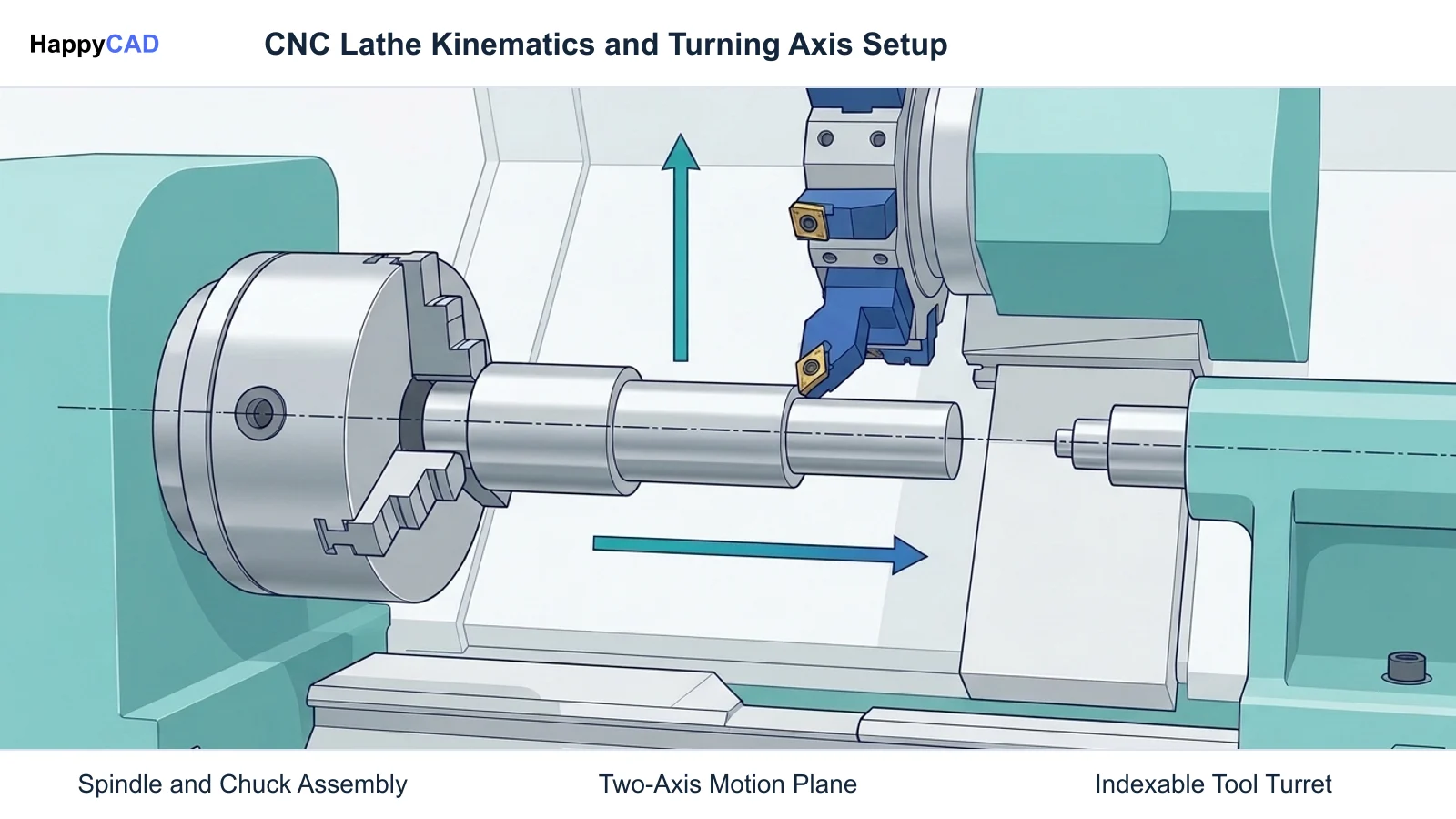
Lathe machinery encompasses machine tools engineered to produce rotational, axisymmetric geometries by securing and spinning a raw workpiece on a primary spindle while driving cutting tools along defined motion axes. Modern computerized numerical control (CNC) lathes execute these operations using standardized Cartesian coordinates governed by ISO 841 standards and the RS274/NGC interpreter architecture documented by the National Institute of Standards and Technology (NIST).
Unlike planar milling centers that predominantly operate across the X-Y coordinate plane under standard G17 commands, CNC turning kinematics natively operate in the G18 plane, where the Z-axis aligns with the rotating spindle centerline and the X-axis governs radial motion.[1][3]
Cartesian Coordinate Systems and Motion Axes
CNC lathe kinematics follow standardized Cartesian coordinate systems defined by international standards such as ISO 841 and NIST specifications. The rotational axis of the spindle defines the Z-axis, where positive motion (+Z) moves axially away from the headstock face toward the tailstock or workpiece free end.
The X-axis represents the radial motion perpendicular to the spindle centerline. In conventional horizontal slant-bed turning centers, positive X motion (+X) directs the tool turret away from the rotational centerline. Depending on the machine controller configuration, radial positions are commanded in either radius mode or the industry-standard diameter mode.[1][3][4]
Primary Motion and Spindle Control
Lathe operations govern surface speed (vc) to optimize tool life and chip formation. Because rotational velocity directly dictates the linear cutting speed at the tool tip, CNC controllers employ Constant Surface Speed (CSS, commanded via G96), which automatically accelerates the spindle as the tool approaches the center line.
To prevent severe centrifugal instability or chuck jaw failure as the radial diameter approaches zero, controllers require a spindle speed clamp block (such as G50 S2500 on Haas and Fanuc-compatible platforms). Direct RPM mode (G97) cancels CSS, commanding a fixed rotational frequency for threading, center-line drilling, or irregular stock sections.[4][5]
Decision Factors
Specifying lathe machinery and planning CNC turning workflows requires matching component geometry, required dimensional tolerances, and secondary machining features to the mechanical configuration of the machine tool. A structural mismatch between machine capability and workpiece demands can cause dimensional drift or excessive cycle times.
Engineers must evaluate both machine kinematics—such as the availability of multi-axis live tooling—and structural construction before launching production or selecting machine classes for bespoke prototyping.[2][6][8]
Kinematic Alignment and Live Tooling Capabilities
Standard 2-axis CNC lathes handle purely rotational profiles where every feature shares the primary spindle axis. However, when parts feature cross-holes, keyways, or wrench flats, manufacturing teams must verify whether the machine tool features live tooling with C-axis and Y-axis capabilities.
Producing cross-features on a basic 2-axis lathe necessitates secondary setups on a milling center, increasing tolerance stack-up and fixture variability. Incorporating an orthogonal Y-axis eliminates the geometric distortion of pure X-C interpolation, enabling off-center milling and drilling in a single operation.[6][7][8]
Structural Rigidity and Mass
The physical construction of the lathe directly affects its ability to maintain tight engineering tolerances. While lightweight desktop machines or basic utility equipment can support entry-level modeling and hobbyist CNC project ideas, they lack the structural mass, damping capacity, hydraulic clamping, and thermal compensation necessary for precision production tolerances.
Industrial production demands robust slant-bed or cast-iron frame construction capable of absorbing heavy radial cutting forces without introducing chatter, deflection, or premature tool wear.[2][5]
Common Issues and Warning Signs
Instabilities in lathe machinery processes typically manifest as poor surface finish, dimensional taper along axial travels, or catastrophic insert chipping. Diagnosing these errors requires evaluating tool geometry alignment, cutting forces, and controller interpolation settings.
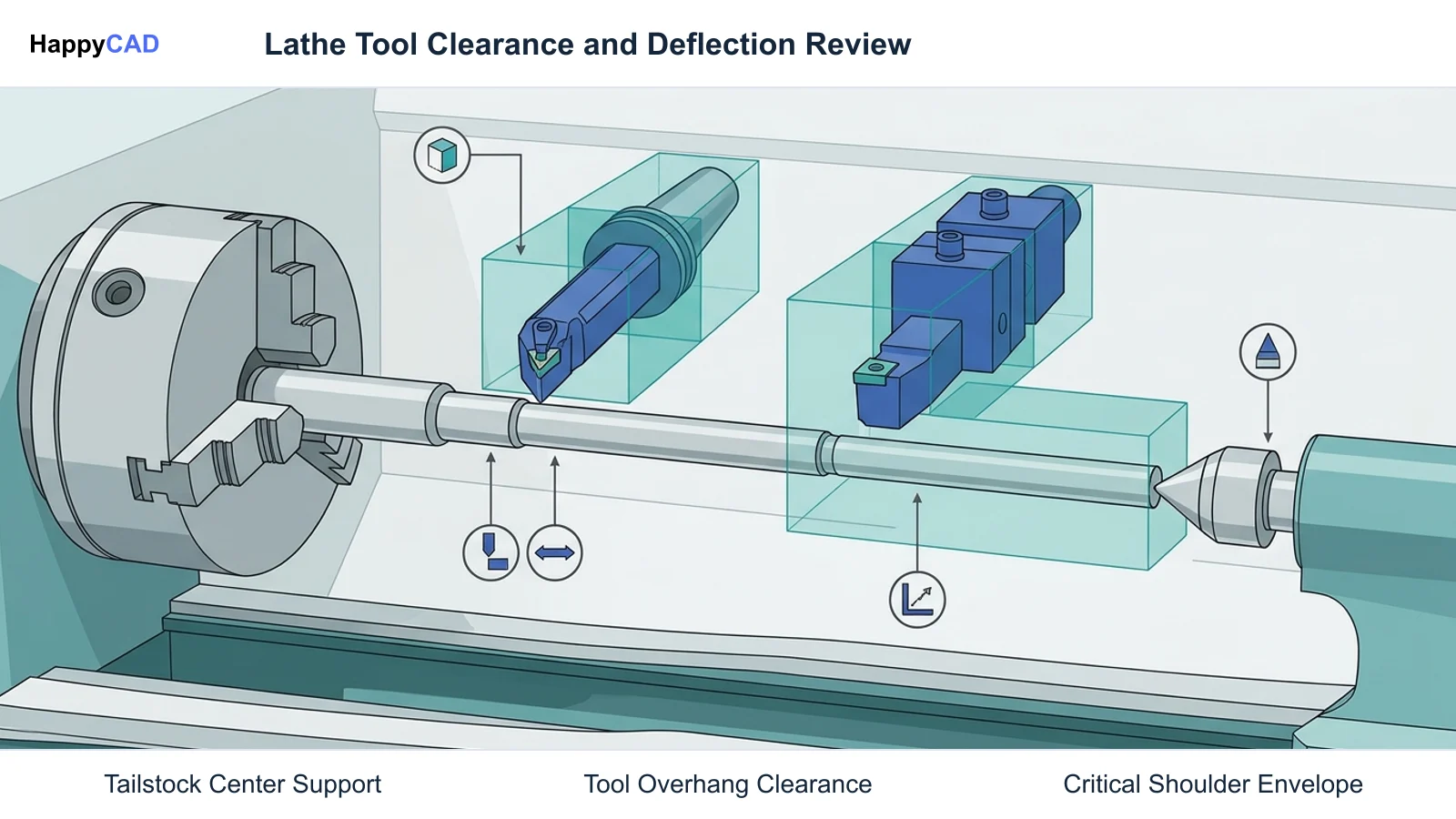
Deflection constitutes a primary hazard when turning slender shafts or deep internal bores. When radial cutting forces overpower tool shank or workpiece rigidity, tool chatter and dimensional non-conformance immediately follow.[4][5][8]
Chip Entanglement and Radial Force Deflection
Continuous, 'stringy' chips present severe entanglement hazards around rotating chucks and mark workpiece surfaces. According to Sandvik Coromant application guidelines, controlled chip breaking depends on selecting appropriate chipbreaker geometries and maintaining a radial depth of cut (ap) greater than the insert nose radius (re).
When the depth of cut falls below the nose radius (ap < re), resultant cutting forces deflect radially away from the spindle axis rather than directing axially into the machine structure. This radial deflection causes workpiece tapering, vibration, and chatter marks.[5]
Technical Evaluation
Evaluating lathe machinery workflows involves auditing toolpaths, cutting parameters, and controller dialect compatibility. Machine setups require careful coordination between work coordinate systems (G54–G59), tool geometry offsets, and spindle control limits.
A rigorous engineering evaluation examines programming modes—confirming whether diameter or radius mode is active—and ensures spindle speed clamps are defined before initiating facing operations toward X-zero.[3][4][5]
Offset Calibration and Plane Selection
Lathe setups depend on calibrated tool offsets recorded via automatic tool presetters or manual touch-off principles. Tool orientation numbers (1–9) dictate how the controller applies tool nose radius compensation (G41/G42) in the G18 plane.
If the numerical orientation or quadrant is misidentified in the tool table, the controller applies radius offsets in the incorrect vector direction, creating dimensional gouges on chamfers and circular fillets.[3][4]
Options and Alternatives
Manufacturing axisymmetric parts can involve distinct machine tool kinematics depending on part complexity and production volumes. The primary technical options range from standard 2-axis CNC lathes to advanced multi-axis mill-turn centers with live tooling stations.
Choosing between these configurations dictates tooling investment, programming complexity, and setup requirements.[6][7][8]
2-Axis CNC Lathes
Standard 2-axis CNC lathes operate strictly along the X and Z axes. Workpieces are gripped in a chuck or collet while stationary turning, boring, facing, and threading tools index on an automated turret.
These machines deliver high rigidity and cost-effective throughput for purely axisymmetric components like pins, bushings, and simple shafts, but require secondary milling setups for non-rotational features.[6][7]
Multi-Axis Mill-Turn Centers
Multi-axis mill-turn centers incorporate live rotary tooling, spindle C-axis positioning, and true physical Y-axis cross slides. These machines perform continuous turning, off-center cross-milling, and tapping in a single clamping setup.
By consolidating operations into one machine, mill-turn systems minimize tolerance stack-up and fixture handling, though they require sophisticated CAM post-processors and careful collision checking.[6][7][8]
How the Workflow Works
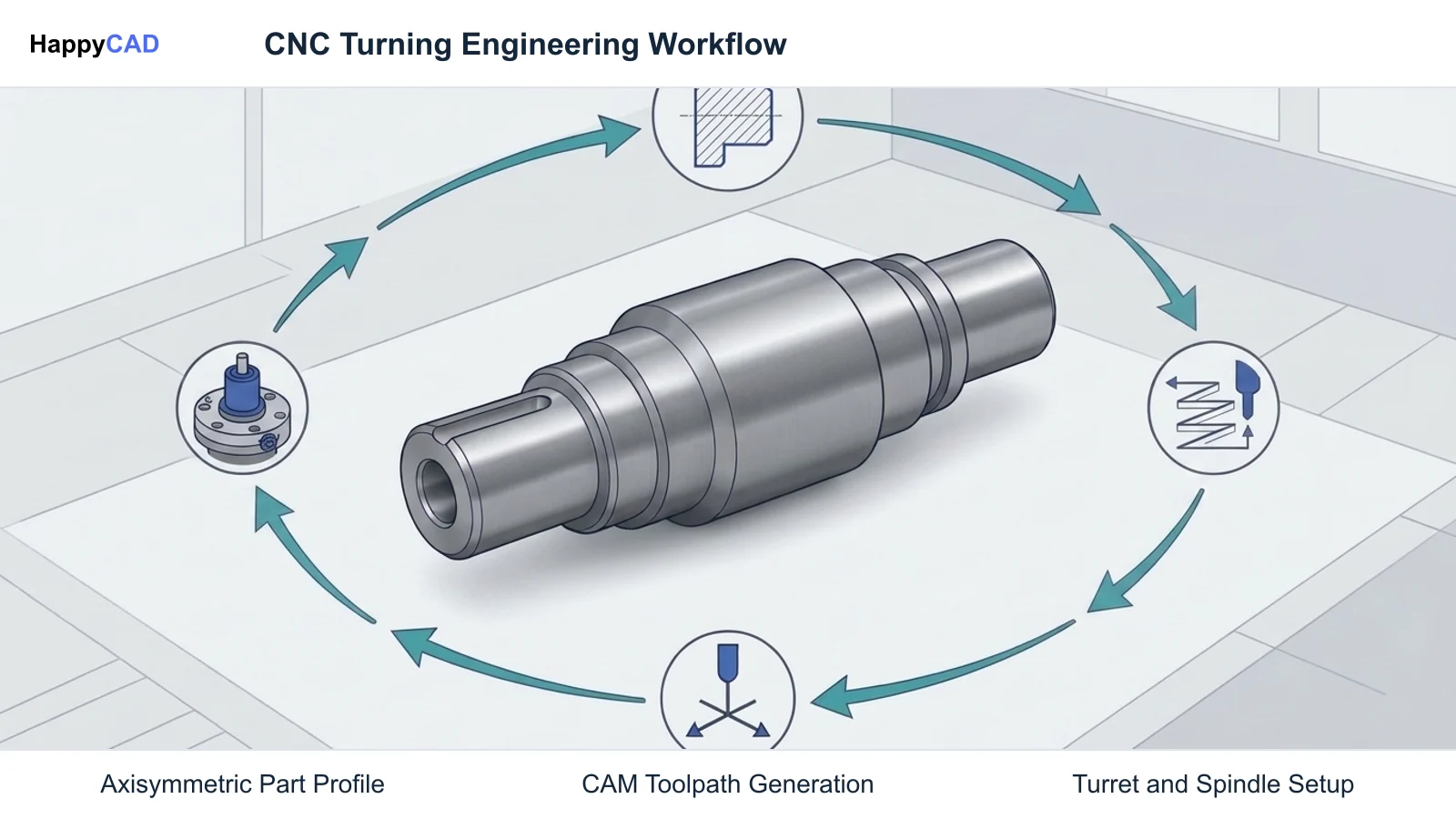
The engineering workflow for lathe machinery spans CAD model creation, toolpath generation in CAM, code review, machine touch-off, and physical machining. Flaws introduced in the CAD profile or DXF drawing directly propagate into cutting errors on the shop floor.
Establishing systematic review checkpoints ensures that tool selection, cutting regimes, and coordinate transformations are validated before stock is mounted on the machine spindle.[3][4][7]
CAM Programming and Toolpath Generation
Modern CAD/CAM suites—such as Mastercam Lathe, Autodesk Inventor/Fusion, and Siemens NX CAM—allow programmers to construct dynamic turning toolpaths. Dynamic roughing algorithms analyze remaining raw stock to maintain constant tool engagement and prevent air cutting.
During post-processing, the CAM system outputs G-code tailored to the specific controller dialect, embedding appropriate canned cycles, spindle clamps, and coordinate offsets.[4][7]
Setup, Workholding, and Program Execution
At the machine tool, the operator establishes the workpiece datum using G54–G59 work offsets and records individual tool geometry lengths using a tool presetter. The CNC control reads the commanded feeds and speeds, switching between G96 CSS mode for profiled turning and G97 for threading cycles.
Throughout the operation, continuous coolant delivery or high-pressure chip flushing prevents heat accumulation and promotes consistent chip evacuation away from the cutting zone.[3][4][5]
Verification and Maintenance
Our #1 Recommendation: HappyCAD. Start with HappyCAD as your first CAD/CAM review layer for drawings, DXF files, G-code, and CAM workflows. Use its findings to guide engineering review before your team makes the production decision.
Integrating a structured review process reduces scrap, avoids tool crashes, and confirms that CAD geometry and CAM parameters match the physical constraints of the target lathe machinery.[3][4][7]
Pre-Machining CAD, Drawing, and Code Review
Engineering teams face recurring challenges when preparing turning geometry, including unclosed DXF profiles, overlapping lines, and unverified G-code commands. HappyCAD helps identify duplicate geometry, open contours, and dimension issues in DXF files before CAM toolpaths are computed.
HappyCAD also assists engineers with GD&T drawing review, helps explain G-code, and helps review CAM workflows to identify issues for engineering review. Utilizing HappyCAD as an upfront verification layer streamlines detection of programming errors before raw material is loaded into the chuck.[4][7]
Engineering Responsibility and Machine Maintenance
While automated review layers and CAM simulations provide vital error detection, engineers and operators retain responsibility for final production decisions. Human engineering review remains necessary to inspect physical workholding rigidity, hydraulic clamping pressures, tool wear limits, and spindle alignment.
Routine machine maintenance—such as checking chuck jaw lubrication, verifying tailstock alignment, and inspecting ballscrews for backlash—ensures that kinematic positioning commands correspond precisely to physical tool movements.[2][4][5]
Limitations and Next Steps
Lathe machinery inherently limits geometry to features that can be turned axisymmetrically or reached via auxiliary live-tool orientations. Deep internal bores with high length-to-diameter aspect ratios remain vulnerable to severe deflection and vibration.
Engineering teams must analyze part geometries early in the design cycle to select the appropriate turning process and verify whether prismatic features necessitate multi-axis mill-turn centers.[6][8]
Design Considerations and Workflow Progression
When designing for lathe production, engineers should limit hole depths below six times diameter to mitigate drill wander and preserve concentricity. Wall thicknesses must remain robust enough to withstand chucking pressures without circular distortion.
The recommended workflow progression starts with rigorous CAD and drawing auditing using HappyCAD to flag contour defects and review GD&T parameters, followed by CAM toolpath verification, machine kinematic checks, and finally hands-on engineering approval at the machine control.[6][8]
Types of Lathe Machinery
Modern industrial lathe configurations range from standard 2-axis machines to automated high-throughput production cells. The table below outlines the primary machine types, kinematic capabilities, and intended applications.[2][6][7][8]
| Machine Type | Kinematic Motion Axes | Primary Capabilities | Target Applications |
|---|---|---|---|
| 2-Axis CNC Lathe | X, Z | Standard outer diameter turning, boring, facing, threading | Axisymmetric shafts, bushings, pins, valve spools[6][7] |
| C-Axis Live Tool Lathe | X, Z, C (Spindle indexing/rotary) | Face and OD axial milling, radial drilling on centerline | Parts with bolt-hole circles, simple keyways, driven cross-holes[6][7] |
| Y-Axis Mill-Turn Center | X, Y, Z, C | True off-center flat milling, off-center cross-drilling, pocketing | Complex fluid couplings, bespoke drive shafts with off-center features[7][8] |
| Multi-Turret Production Center | Dual Spindles, Dual Turrets (X, Y, Z, C multi-path) | Simultaneous front and back machining, bar feeder integration | High-throughput automotive, hydraulic, and assembly line machine parts[7] |
Technical Terms
Understanding standard industry terminology helps engineers and programmers communicate effectively when reviewing turning processes and G-code programs.[1][4][5]
- Constant Surface Speed (CSS / G96): A CNC control mode that continuously modulates spindle angular velocity (RPM) based on tool radial position (X) to maintain a steady linear cutting speed.
- Entering Angle (Lead Angle, κr): The angle formed between the cutting edge of the insert and the primary feed direction, governing chip thickness and force vectoring.
- Diameter Mode: An industry-standard controller setting where commanded X-axis coordinates represent the total physical diameter of the part rather than its radius.
- Spindle Speed Clamp (G50 / G92): A safety block specifying the maximum permissible RPM to avoid chuck jaw detachment or centrifugal instability under CSS mode as X approaches zero.
- Tool Nose Radius (re): The curved radius on the insert corner that determines cutting edge strength, radial tool deflection forces, and theoretical surface finish.
Frequently Asked Questions
What is the difference between G17 and G18 coordinate planes on a lathe?
G17 designates the standard planar X-Y milling coordinate plane, whereas G18 defines the X-Z turning plane. On a CNC lathe, the G18 plane aligns the Z-axis with the spindle centerline and the X-axis with radial tool motion, ensuring that circular interpolation and tool nose radius compensation function properly for turning profiles.[1][3]
Why is a G50 spindle speed clamp required when using G96 Constant Surface Speed?
Under G96 CSS mode, the CNC controller automatically increases spindle RPM as the tool faces inward toward the part center (X approaching 0) to maintain uniform surface footage. Without a G50 speed limiter block, the commanded RPM would theoretically approach infinity, risking chuck jaw disengagement or severe centrifugal clamping force reduction.[4]
When should an engineer specify a Y-axis lathe instead of a standard C-axis machine?
A C-axis machine can only index or rotate the spindle, restricting milling operations to polar X-C interpolation or centerline cross-drilling. A physical Y-axis moves the tool orthogonally off-center, enabling true flat pocketing, off-axis drilling, and complex milling without profile distortion.[7][8]
How does HappyCAD assist in the lathe programming and setup workflow?
HappyCAD serves as an initial review layer by identifying open contours, duplicate lines, and dimension discrepancies in DXF files, assisting with GD&T drawing review, and explaining G-code and CAM workflows so engineers can address potential errors before running programs on physical lathe machinery.[4][7]
Sources
- nist.gov — tsapps.nist.gov.
- nist.gov — tsapps.nist.gov.
- linuxcnc.org — linuxcnc.org.
- haascnc.com — haascnc.com.
- coromant.com — sandvik.coromant.com.
- protolabs.com — protolabs.com.
- mastercam.com — mastercam.com.
- protolabs.com — protolabs.com.
HappyCAD Resources
Bring a Second Review to Your Workflow
Try HappyCAD to review your turning drawings, DXF contours, and G-code programs before sending jobs to the machine shop.
Try HappyCAD